
May 2024
How to Approach Credit Analysis in FINPACK
Step 01: Data Sources
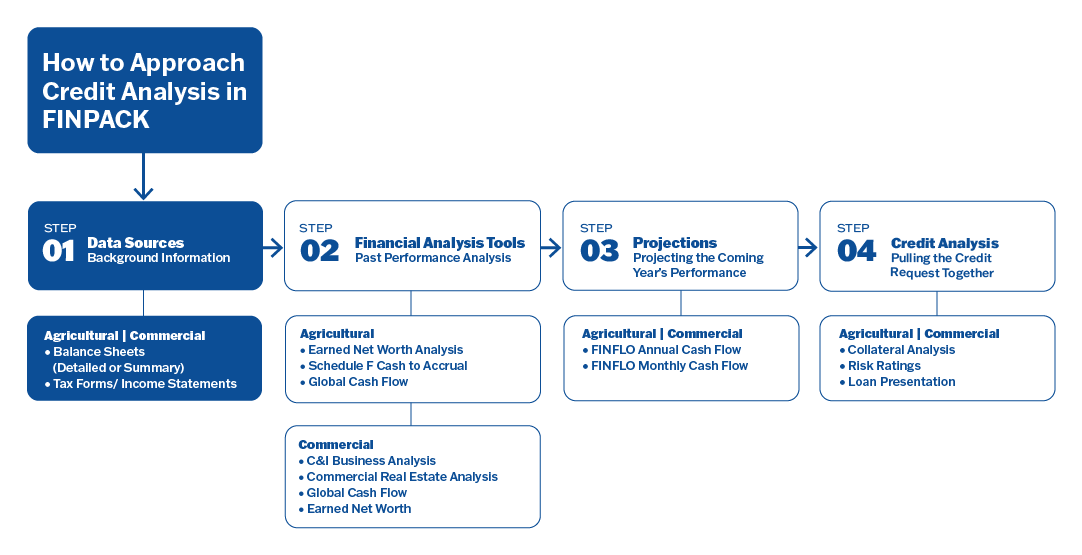
Everything in FINPACK begins with Data Sources. The first step in using FINPACK is to gather the information your client has provided, then decide which data source you will use to get that information into FINPACK — Detailed or Summary Balance Sheets, Tax Forms, or Income Statements.
Balance Sheets
Balance Sheets are where any analysis or projection begins in FINPACK, so this is the foundation. You can choose to complete a detailed Balance Sheet or opt for a Summary Balance Sheet. Your decision will depend on the amount and quality of the information you have access to, and the kinds of analysis you plan to do.
Data entry for detailed balance sheets allows the user to enter greater detail and keep a more thorough history for any FINPACK file. An advantage of detailed balance sheets is the efficiency they can provide when using other FINPACK tools. For example, Financial Analysis tools use detailed entry related to capital assets. This reduces the time it takes to enter information like capital sales and purchases when doing a past performance analysis. Once you have created a balance sheet for any client, you can then copy it forward in subsequent years, updating just values that have changed, and reducing the time required for data entry going forward.
If you have created a detailed Balance Sheet, FINPACK automatically generates summary Balance Sheets. However, if you just need the Summary Balance Sheet, you can also create them directly using market, cost or both valuation methods. Data entry for summary balance sheets only allows the user to enter total values for each asset category. Summary balance sheets can be quite useful for working with a new client to build financial history for their file.
Tax Forms
In FINPACK, you can enter Schedule Cs, Es, Fs, and K-1s, and Forms 1040s, 1065s, and 1120s. The data entry for each of these matches its respective tax form layout. Tax Forms allow you to complete analyses such as Schedule F Cash to Accrual, C & I Business Analysis, and Global Cash Flow. You can also calculate Debt Coverage directly on the tax-form input. To complete data entry, you simply need the corresponding tax form,
and you will be able to enter each line.
Income Statements
FINPACK also allows you to enter data in the format of an income statement you might receive from a client. The income statement layout in FINPACK allows for the entry of pro forma, accountant-reviewed, or internally prepared statements. Income statements are available in Ag and Commercial FINPACK files and are used in Global Cash Flow analysis.
Step 02: Financial Analysis
Once you have the data sources entered into FINPACK, the next step is to decide which Financial Analysis tool(s) you are going to use. These tools are used to analyze the past performance of a particular client. FINPACK has specific Financial Analysis tools available for agricultural and commercial customers. The information received from the borrower and the type of business being analyzed determine the best financial analysis tool to use.
In agricultural files, the following are available:
- Schedule F Cash to Accrual Analysis
- Earned Net Worth Analysis
- Global Cash Flow Analysis
In commercial files, you have the following available:
- C & I Business Analysis
- Commercial Real Estate Analysis
- Earned Net Worth Analysis
- Global Cash Flow Analysis
Schedule F Cash to Accrual Analysis (use for agricultural borrowers)
The Schedule F Cash to Accrual Analysis uses the basic cash income and expense information received from the farm client, the Sch. F tax form, to arrive at an accrual adjusted net farm income for the fiscal year. This FINPACK analysis tool provides a more complete picture of past years’ farm financial performance.
Information Required
- Schedule F tax return for the fiscal year.
- Beginning balance and ending balance sheets for the fiscal year.
- Information about capital purchases and capital sales during the analysis period.
- Other farm-related items that may not be found on the Sch. F tax form. Examples may be Form 4797 or a Sch. E tax form for information on livestock cull income, feeder livestock purchases, hedging information, and other income. Use this Schedule F Analysis Input Form to help collect this additional information from your clients.
C & I Business Analysis (use for commercial borrowers)
C & I Business Analysis is a commercial business financial analysis tool which provides a financial comparison of a company internally and, optionally, to its peers, the industry at large. This analysis is used for production and service-oriented businesses. The internal comparison looks at the balance sheets and income statements on a common sized and percent change basis. This analysis also generates a UCA (Uniform Credit Analysis) cash flow analysis, a Statement of Equity report, and a Cash Driver’s report to help further analyze the business. The industry comparison is an optional comparison point for those subscribed to the RMA (Risk Management Association) add-on.
Information Required
- The appropriate tax return form or income statement for the business being analyzed.
- Beginning and ending balance sheet for the time period being analyzed.
Commercial Real Estate Analysis (use for commercial borrowers)
The Commercial Real Estate Analysis tool is designed to provide lenders with the ability to determine whether a specific investment property will be able to meet debt obligations. This tool also provides information regarding vacancy rate thresholds, supportable loan amounts, as well as a standard income and expense summary. Also, perhaps the most insightful section of the output of the CRE is the stress testing report. This is the section which demonstrates the impact of various events such as increased vacancy rates, basis point increases in interest rates, and decreased rental rates.
Information Required
- An appropriate tax form or income statement for the property to be analyzed. Or if this is an analysis of a new investment property, a new analysis with no income history can be selected.
- General information including the type of property (multi-family, retail, etc.), and the location details of the property.
- Stress testing factors to include in the analysis. This includes items such as maximum loan to value, minimum debt service coverage ratio, and increases in interest rates.
Earned Net Worth Analysis (use for either agricultural or commercial borrowers)
The Earned Net Worth Analysis tool allows you to differentiate net worth change attributed to earnings versus net worth change coming from asset valuation changes for borrowers providing market value balance sheets. For these borrowers, Earned Net Worth change is often the best indicator of financial performance and is a proxy for profitability. Earned net worth can also be used to calculate repayment capacity of the business during the analysis period. And by entering a few more pieces of information, analysis allows you to estimate net income for the period. The Earned Net Worth Analysis tools is available for both agricultural and commercial type of customers and functions the same way for both.
Information Required
- Beginning balance sheet for the analysis period. This does not have to be a fiscal year-end balance sheet. It can be at any point in the year or “at time of renewal.”
- Ending balance sheet for the analysis period. It is best if this is about a year after the beginning balance sheet.
- Information about capital purchases and capital sales during the analysis period.
- To estimate net income for the period, non-business income, family living withdrawals, and income taxes paid will also need to be entered in the analysis.
Global Cash Flow Analysis (use for either agricultural or commercial borrowers)
Many businesses today have complex multi-entity structures. Multiple entities can make it rather difficult to accurately analyze the cash flow performance and repayment ability of each business, individual, and guarantor involved in the global lending relationship, as well as the global debt coverage for all of the businesses and individuals/guarantors included in the analysis. This allows lenders to best evaluate more complex customers that have multiple entities and individuals involved in the total lending relationship.
When this is the case, utilize the Global Cash Flow Analysis tool to find out which entity is contributing to the global bottom line, and which is not.
Information Required
- The appropriate tax return for each entity AND individual AND guarantor involved in the ‘global’ lending relationship of the business.
- Optional: Balance sheets for each entity, individual, and guarantor.
Commercial Credit Analysis tools allow you to use the balance sheet and income statement information received from a commercial business client to analyze past performance. Tools available for commercial credits include: C & I Business Analysis, Commercial Real Estate Analysis, Earned Net Worth Analysis, and Global Cash Flow Analysis. Earned Net Worth Analysis and Global Cash Flow Analysis function exactly the same for agricultural or commercial credits.
Step 03: Projections

FINPACK allows users to create both annual and monthly cash flow projections (FINFLO) for both agricultural and commercial files. In agricultural files, users can also create a monthly cash flow projection using crop and livestock budgets. Which option should you use? Well, an economist’s favorite answer is — it depends. Use this an overview to help determine which cash flow projection option will be best.
Anytime an attempt is made to predict the future, a LOT of variables are involved. This is why so much information can be entered into FINFLO. Below is a general list of all the information that can be entered for cash flow projections. These lists are rather exhaustive and depending on the specific client you are working with, not all these items may be applicable or relevant.
For Cash Flow Projections in Agricultural Files:
- Estimated crop production and sales information.
- Estimated livestock production and sales information.
- Farm operating expense estimates
- Estimates of any other cash inflows or outflows expected during projection period (like government payments, custom work income, personal income, patronage dividends, family living expenses, and income taxes, etc.).
- Information on any capital purchases and sales expected to occur during the projection period.
- Payments and additional borrowings planned on existing and proposed loans.
- Estimates of ending balances for prepaid expenses, accounts receivable, and accounts payable.
- The value of labor and management to capture the opportunity cost of the time the operator is putting
into the business.
For Cash Flow Projections in Commercial Files:
- Estimated cash inflows for the business.
- Cost of goods sold estimates.
- Selling, General and Administrative (SGA) (or operating) expense estimates.
- Information on any capital purchases and sales expected to occur during the projection period.
- Information on any equity purchases and sales expected to occur during the projection period.
- Payments and additional borrowings planned on existing and proposed loans.
- Estimates of ending balances for prepaid expenses, accounts receivable, accounts payable.
The FINFLO cash flow projection tool provides users with a wealth of planning information. In addition to cash inflows and outflows, FINFLO provides:
- A projected ending balance sheet.
- A projected income statement for the projection period.
- Projected change in inventories.
- Projected crop and livestock production (in agricultural files).
- Projected debt repayment, profitability, and efficiency ratios for the plan period.
- Projected net worth change for the projection period.
Step 04: Credit Analysis
FINPACK provides users with several valuable credit analysis tools to make the final credit recommendation. Each of these tools provides the user with a great degree of flexibility to best fit the unique credit culture of their institution.
Collateral Analysis
FINPACK’s Collateral Analysis tool allows the financial institution to determine their loan to value and collateral margin for a borrower. This analysis can be completed as a global analysis of all a customer’s collateral; alternatively, individual collateral groupings can be analyzed on their own and then totaled together for a global analysis. This methodology allows for the calculation of loan-to-value for individual collateral groups, while still providing total loan-to-discounted value, total collateral coverage margin, and total dollars of collateral margin for the customer.
The collateral analysis is built from the customer’s detailed market value balance sheet. In collateral analysis data entry, the user can enter any additional collateral or loans to be analyzed, select the assets to be utilized as collateral, set the allowable advance rate for assets, and select the loans to be utilized in the analysis.
Risk Reports
The Risk Reports (or Risk Rating) tool in FINPACK is designed to be customized and allows the user to replicate the current risk rating model(s) already established by the lending institution. A variety of data, both numbers, and ratios, from FINPACK and elsewhere can be used when building custom Risk Reports. This can include information provided by FINPACK or external information like the borrower’s credit score, a character score, or similar data. A financial institution can have as many risk rating models as needed for their lending needs.
The output provided by the Risk Report shows the borrower’s result for each designated criterion of the model. Each criterion is scored and weighted based on the model metrics. The borrower’s score multiplied by the weight gives the total score for each criterion. The sum total score for all criteria is shown at the bottom, along with the Overall Rating assessment of the borrower’s risk.
Credit Decision Scorecards
Similar to Risk Reports, the Credit Decision Scorecard tool in FINPACK provides a substantial degree of flexibility for users. Depending on the model used, the principal(s) concerned, and the nature of the loan request, FINPACK Credit Decision Scorecards allows the user to:
- Determine if an application meets minimum requirements to proceed to the next step of the lending process.
- Determine if the applicant is strong and if the request carries so little risk that the Scorecard approval will suffice, and no greater credit scrutiny is required.
Like Risk Reports, to get started, a model must be in place for your financial institution. As many Credit Decision Scorecard Models as needed can be built into FINPACK for your institution. Once the model is in place, the process of using the scorecard tool is quite simple. The user simply answers the questions or enters the data for the evaluation criteria included in the model. Then, the tool will display whether the request meets the required approval criteria. The user can override the approval status determined by the scorecard model, and can also enter comments and explanations regarding the scorecard.
Loan Presentations
The Loan Presentations tool in FINPACK allows for a consistent and concise loan presentation format customized to your institution’s needs. Loan Presentation Templates allow users to pull information directly from other places in FINPACK and combine this with the specific loan narrative components. Multiple templates can be created to fit the various credit evaluation needs of your institution.
Loan Presentations work similarly to a word processor, providing the same functionality to streamline the process. One of the most impactful features is any FINPACK data linked in the loan presentation will automatically update when the data source values are updated. Finally, a loan presentation packet can be created that includes default FINPACK output, specific customer documents, and external documents to complete the full loan presentation packet.
Learn more about FINPACK Credit Analysis
This provides a high-level overview of how to approach credit analysis in FINPACK. As you begin your work with FINPACK, these steps should provide you with a good framework to get started with your analysis. If you have questions or need further insight into FINPACK and its numerous tools, you can also access the HELP function inside FINPACK itself, browse the suite of videos in FINPACK Online Training, or of course reach out to our Support team for assistance