
Updated January 2026
Gathering customer data for year-end analysis and credit renewal can be difficult. FINPACK tries to assist with the process by providing a Balance Sheet Input Worksheet with the customer’s most recent balance sheet data for updating. This tool is provided to the customer as a means to get current, updated balance sheet information for the current year. This worksheet is one FINPACK tool to assist with customer renewals.
What is the balance sheet input worksheet?
The FINPACK balance sheet input worksheet creates the selected customer balance sheet as a worksheet. This form displays details from the selected balance sheet and provides areas for the customer to update the information with current values and/or add additional information as appropriate. This worksheet can be given to customers in preparation for their year-end analysis or credit renewal visit.
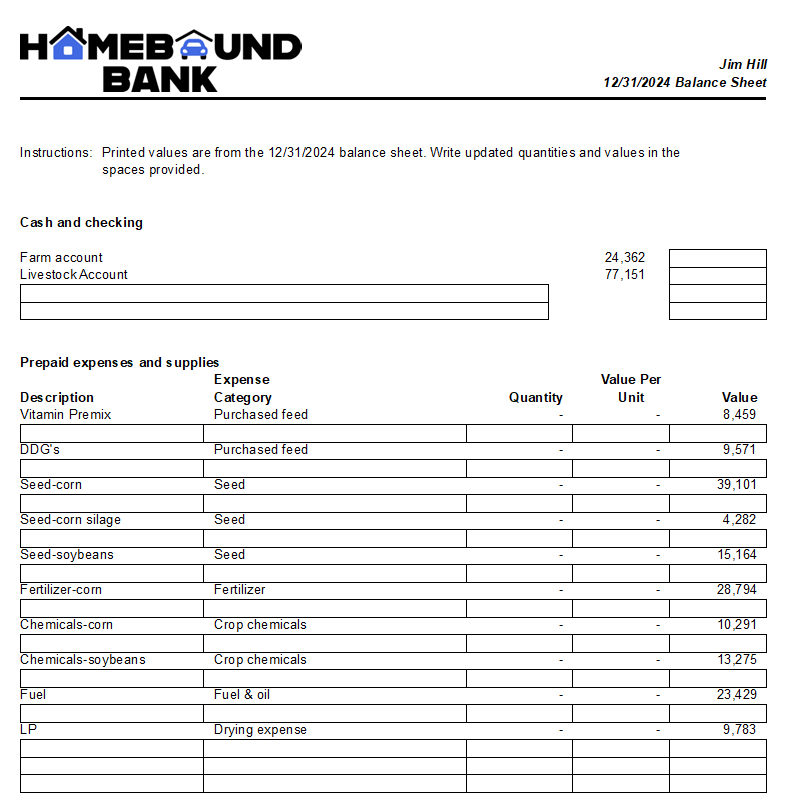
How to create the balance sheet input worksheet.
Creating and printing the balance sheet input worksheet is easy when you know where to do so. The option to create an input worksheet is found in the Print dialogue box. In the bottom half of the box, Input Worksheet Options is a tab option. Selecting this tab will allow printing or previewing the selected balance sheet as a worksheet. As always, the worksheet can be printed to a printer or as a PDF or Text file.

Working with new customers.
If beginning to work with a new customer, FINPACK has an input form available to assist with gathering the new customer’s information. A balance sheet input form and instructions are found in the FINPACK Knowledge Base for use with both agricultural and commercial customers. In addition, there are a number of other FINPACK input forms to assist with gathering customer data for use in FINPACK tools. The Sch. F Analysis – Additional Information form would be an example. Also remember, FINPACK Lite is another way to have customers provide balance sheet data. This is a free tool, available for customer use.

Pauline Van Nurden is currently the Associate Director for the FINPACK Team. She has been with the team since 2017 as an Economist.
Prior to joining the FINPACK Team, she worked as a lender. This provides her valuable industry experience and knowledge in her work with FINPACK. Pauline holds a Master’s Degree in Agricultural Education and Bachelor’s Degree in Applied Economics, both from the University of Minnesota.