

Refinancing loans is a common strategy for business owners facing reduced profits and tight cash flows. By reviewing repayment capacity measures, you can assess a borrower’s ability to repay debts on time. The Debt Coverage Ratio is a reliable indicator of whether the business generates enough income to cover current interest expenses and all intermediate and long-term debt payments. It is important to realize that the calculation of these repayment capacity measures includes non-farm income and debt, so they reflect the full picture of the borrower’s debt repayment abilities and do not solely reflect business performance.
When using FINPACK Projections, be sure to follow the steps outlined below to ensure the Debt Coverage Ratio and other repayment capacity measures are accurate when incorporating a refinance scenario. This process can be applied to refinance all or a part of a loan within a FINPACK Projection.
Step 1: Paydown/ Payoff the Loans to be Refinanced
Start by calculating the paydown/payoff amount(s) of the loan(s) that will be included in the refinance for the projection. This can be done using the Fixed-Principal Payments option in the Loan Calculator. Point your cursor to the P & I Payments cell for the loan you wish to refinance. Then, initiate the Loan Calculator. This quickly and easily allows you to calculate the payoff/paydown amount with interest. Once you’ve calculated the appropriate payment amount, use the Paste button to paste the payment into the projection. Repeat this as necessary for all loans being refinanced in the projection.
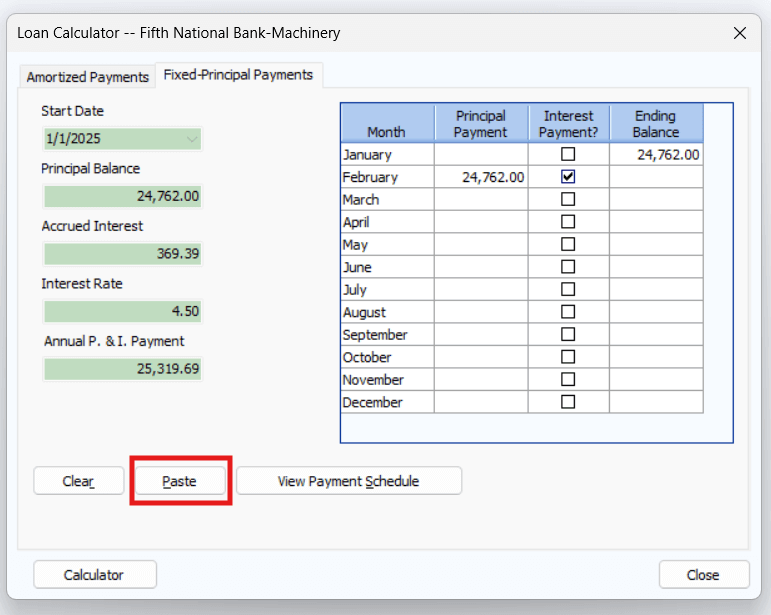
Using the Fixed-Principal Payments option in the FINPACK Loan Calculator.
Step 2: Enter the Amount from Refinance in the Loan Payment Detail
A key component of refinancing a term loan is entering the Amount from Refinance in the Loan Payment Detail. When you enter “Loan Payment Detail”, you will see the payment amount pasted from the Loan Calculator. Below the “Total Payment” line is the ability to enter Amount from Refinance. Enter the amount to be refinanced there. For a monthly projection, enter this in the appropriate month. This amount may be the full loan paydown/payoff, including interest, or it may be the principal portion. This entry should reflect the amount being refinanced into a new loan.
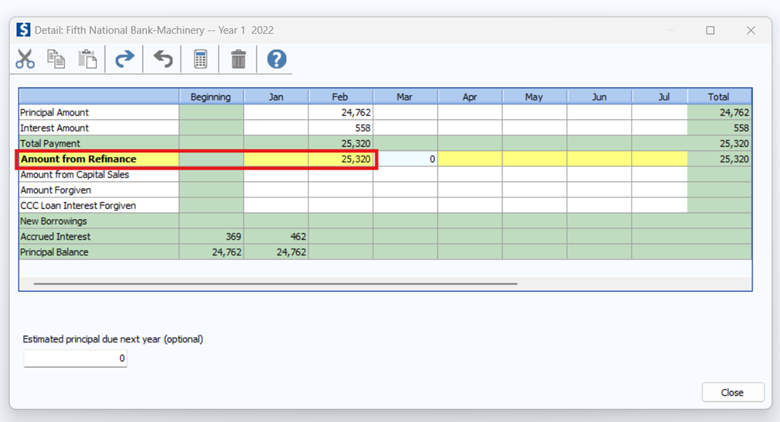
Including the Amount from Refinance in Loan Payment detail.
- If there is a paydown / payoff from capital sales or loan forgiveness, there are also lines where those entries can be made for that situation.
- If the loan being paid off or paid down is a current loan, you do NOT need to make an entry for the amount from refinance or capital sales or loan forgiveness. FINPACK handles the calculation of repayment capacity measures correctly when the loan that is being paid off or paid down is a current loan.
Step 3: Create the New Loan in New Borrowings Data Entry.
Include the new loan for the refinance in New Borrowings data entry. This is done in the same manner as any other projected new borrowing in the plan. New borrowings are entered in New Borrowings data entry in a monthly type of projection. In an annual type of projection, new borrowings are entered in Loan Payments & Borrowings data entry.
Step 4: Include Payments on the new Loan for the Projection Period.
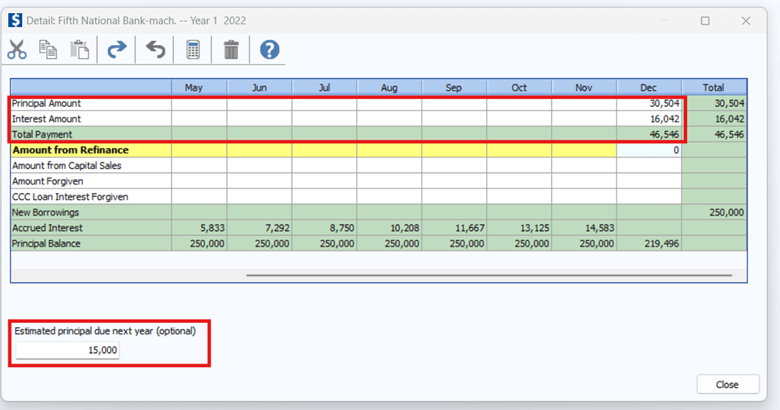
Anticipated payments on the new loan should be included in the cash flow projection. Again, any loan payments on the new loan for this refinance situation are included like any other loan payments. The Loan Calculator can be utilized to help calculate amortized and fixed principal payments for the projection period. No additional information is needed related to the payment on the new loan.
If the payment amount for this projection period is different than the payments for a “typical year” the Estimated principal due next year can be included in loan payment detailed entry. This feature adjusts the projected ending balance sheet, to include the correct principal due on term loans. Therefore, the liquidity and solvency details on the projected ending balance sheet will be correct.
Step 5: Review of Debt Coverage Calculations
Completing these steps will lead to the proper adjustments in the debt coverage calculations. As seen below, the total debt payments and term debt payments from the projection are included in the calculation. Then, there is an adjustment for the Payments from capital sales and refinance. This backs out the payments related to the refinance scenario included in the projection, thus ensuring the Normal term debt payments are included in the term debt coverage calculation for the projection.
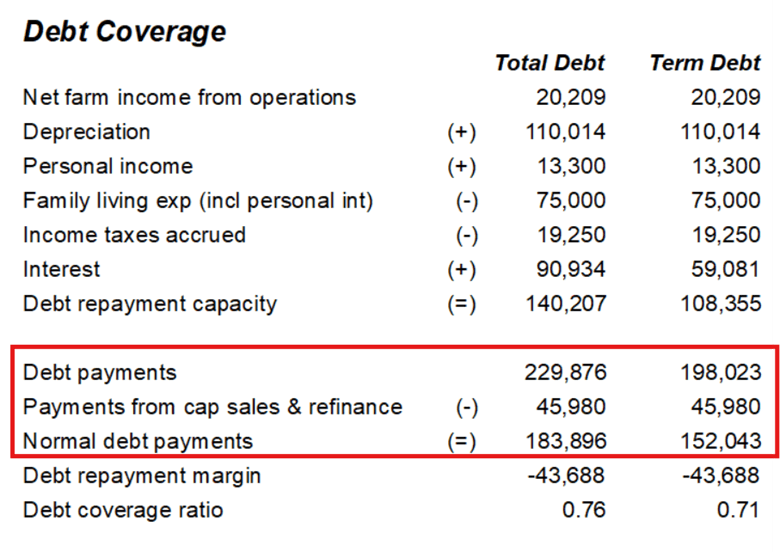
Displayed Debt Coverage calculation detail in a FINPACK Projection.
Summary
By following these steps, you can ensure that loan refinancing is accurately managed within a FINPACK Projection. This process will result in a correct debt coverage calculation, providing a clear overview of the business’ proposed cash flow projection for your underwriting needs.
Connect with FINPACK
Don’t forget to follow FINPACK on Facebook and Instagram, or connect with us on LinkedIn, and be sure to subscribe to FINPACK News email updates.

David Maguire helps Ag and Commercial lenders across the country understand the value of using FINPACK for credit analysis and loan management. David has worked in the marketing, training and education fields in Minnesota, Ireland and Germany.