

In complex agricultural or commercial lending, a single asset often secures multiple loans across different collateral analysis groups. The use of cross-collateralizing an asset across multiple credit analysis groups can lead to “double-counting” or artificially inflating the borrower’s actual net collateral position.
FINPACK now addresses this through the cross-collateral section in the Collateral Analysis tool. Here is a breakdown of how FINPACK manages the accounting of assets used in cross-collateralization to ensure the final collateral analysis totals are both accurate and transparent.
How FINPACK Identifies Cross-Collateralized Assets
When a user includes the same asset or asset category in multiple Collateral Analysis Groups, FINPACK automatically flags it. To prevent the asset’s value from being counted twice in the grand totals, the software applies specific logic:
- The Primary Occurrence: FINPACK identifies the occurrence with the lowest prior lien amount and designates it as the “primary” collateral position.
- Cross-Collateral Positions: All other instances of that same asset in different Collateral Analysis Groups are treated as secondary or “cross-collateral” positions.
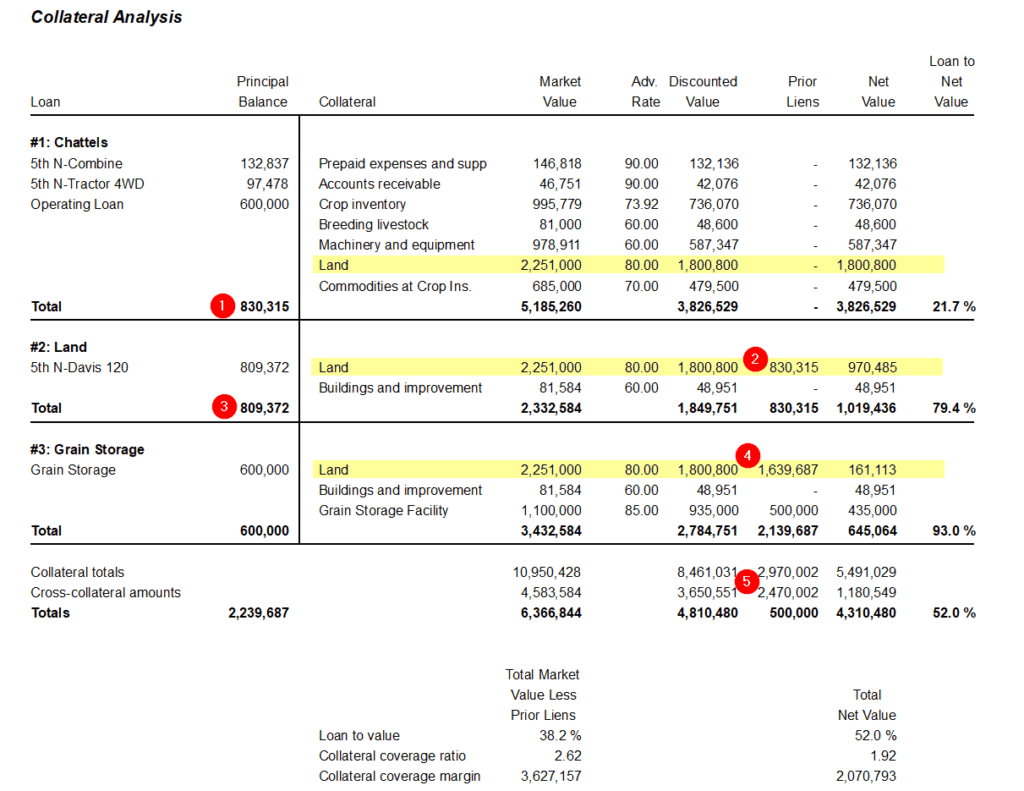
In this example, the real estate parcels serve as security in all three collateral groups, highlighted in yellow. Prior Lien entries in Groups 2 and 3 are used to remove the loan values already secured by the cross-collateralized asset – in this case, the land.
- In Group 2 – Land, the principal balance from Group 1 – Chattels (labeled 1) becomes the prior lien amount for Group 2 (labeled 2).
- In Group 3 – Grain Storage, the prior lien amount (labeled 4) is the combined principal balances from Groups 1 and 2 (labeled 1 and 3 in the graphic).
These cross-collateralized values and prior liens are then removed from the totals for the collateral analysis calculations, as shown in label 5.
The Logic of the Calculation
FINPACK maintains two different perspectives simultaneously: the needs of the individual loan and collateral group and the reality of the overall portfolio.
| Calculation Type | Logic | Purpose |
| Collateral totals | Sum of every asset in every Collateral Analysis Group. | Shows the full collateral amount available to each specific loan group. |
| Cross-collateral amounts | Sum of all “secondary” occurrences of an asset’s value only. | Identifies exactly how much of the collateral value is being duplicated across the analysis. |
| Totals (Adjusted) | Overall collateral totals minus cross-collateral amounts. | Reflects each asset exactly once for a realistic net collateral value. |
Why This Matters for the Collateral Analysis
This dual-tracking system provides three critical safeguards for credit analysts:
- Group Integrity: Each individual Collateral Analysis Group remains accurate. For example, if a user is looking at a specific equipment loan, they see the full value of the equipment assigned to it.
- Sound Lending Guidance: By subtracting cross-collateral amounts from the overall collateral total, the Total (Adjusted) provides a more accurate foundation for lending, ensuring decisions are based on the true collateral value available for the portfolio, rather than inflated totals from the cross-collateralization occurring.
- Exposure Visibility: The cross-collateral section clearly identifies how “intertwined” the collateral is, which is vital for understanding the total risk if one specific loan group underperforms.
Summary
FINPACK allows a lender to see the “big picture” (Totals) without losing sight of the “small picture” (Collateral Analysis Group Totals), ensuring that cross-collateral exposure is never hidden but also never double-counted.
Connect with FINPACK
Don’t forget to follow FINPACK on Facebook and Instagram, or connect with us on LinkedIn, and be sure to subscribe to FINPACK News email updates.

David Maguire helps Ag and Commercial lenders across the country understand the value of using FINPACK for credit analysis and loan management. David has worked in the marketing, training and education fields in Minnesota, Ireland and Germany.