

FINPACK+ now offers the ability to set custom tasks/ ticklers to automatically recur at regular intervals.
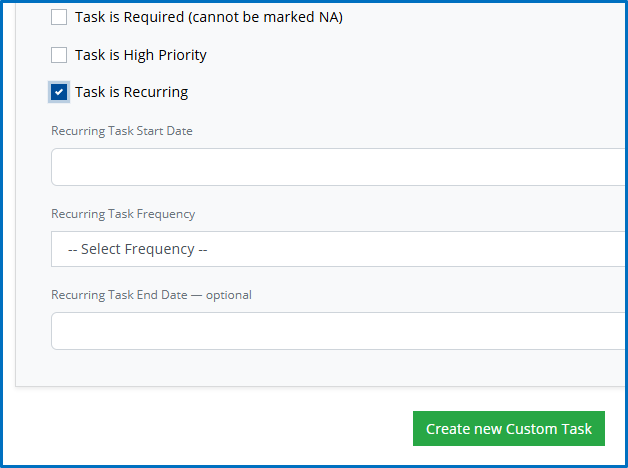
When creating a custom task in FINPACK+, you can now select the option to make the task recurring. Simply select ‘Task is Recurring’, then choose a Task Start Date:
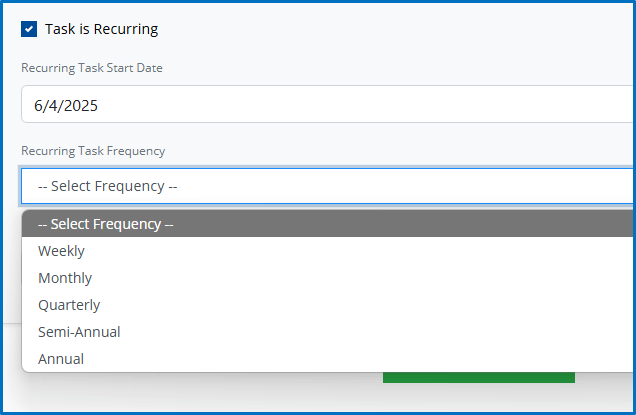
Once you’ve selected the Task Start Date, select the frequency of recurrence. You can choose from Weekly, Monthly, Quarterly, Semi-Annual or Annual. One the initial task is completed, it will reappear according to the frequency you choose.
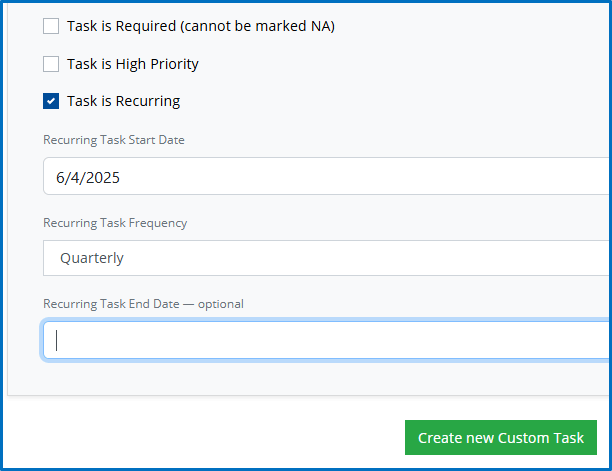
You can choose a Recurring Task End Date, or have it recur until you cancel.
Recurring tasks in FINPACK+ allow you to ‘set and forget’ important tasks which need to occur on a regular basis, whether that’s during the life of a loan or for the entirety of your relationship with a borrower. From collecting balance sheets to reviewing collateral, you can be assured you won’t miss a task.
Connect with FINPACK
If you have any questions about any aspect of FINPACK, please don’t hesitate to contact us, and don’t forget to follow FINPACK on Facebook and Instagram, or connect with us on LinkedIn, and be sure to subscribe to FINPACK News email updates.

David Maguire helps Ag and Commercial lenders across the country understand the value of using FINPACK for credit analysis and loan management. David has worked in the marketing, training and education fields in Minnesota, Ireland and Germany.